Save 20% on select templates!

How to Use a Monthly Budget Tracker for Beginners: Simple Excel Budgeting Made Easy
Learn how to use a monthly budget tracker for beginners to organize income, expenses, savings goals, and spending in one simple Excel spreadsheet.
Sally AbdelAziz
5/20/202612 min read
If you have ever opened your banking app and wondered how your money disappeared so quickly, you are not alone. Budgeting can feel overwhelming when your income, bills, groceries, savings goals, and small daily purchases are scattered across different places. Without a simple system, it is easy to feel like your money is moving faster than you can understand it.
The good news is that you do not need complicated financial software to begin. A monthly budget tracker can help you organize your income, expenses, savings, and spending categories in one clear place, so you can make calmer decisions with your money instead of guessing from memory.
In this guide, you will learn what a monthly budget tracker is, what to track each month, how to fill out your ready-made spreadsheet, how to read your budget dashboard, and which common budgeting mistakes to avoid. If you already downloaded the Monthly Budget Tracker for Beginners, you can follow along inside your own copy as you read. If you have not downloaded it yet, you can get the [Monthly Budget Tracker for Beginners](PRODUCT LINK PLACEHOLDER) here.
What is a Monthly Budget Tracker?
If you often wonder where your money went by the end of the month, a monthly budget tracker gives every dollar a clear place. It helps you record your income, expenses, savings, and spending categories in one simple system, so your money no longer feels scattered across receipts, bank statements, memory, and guesswork.
A monthly budget tracker brings your money information into one clear view. You can record income from your salary, freelance work, side income, or other sources, then compare it with what you spend on housing, groceries, transportation, bills, entertainment, personal care, and savings. Once these numbers are in one place, it becomes much easier to see what is working and what needs attention.
Excel is especially helpful for beginners because it gives you a flexible space to enter, update, and review your numbers without needing a paid budgeting app. With a ready-made Excel budget tracker, you do not have to create formulas or design the layout yourself. You can simply open your copy, fill in the prepared sections, and let the tracker help you see the bigger picture.
For example, a beginner might enter her monthly income, add grocery spending, list her bills, and set a small savings goal in one place. By the end of the month, she may notice that eating out is taking more from her budget than expected. Instead of feeling confused by the whole money picture, she now has one clear category to adjust. That is the real value of a monthly budget tracker: it turns vague money stress into visible, manageable information.
Why Beginners Need a Simple Budget Spreadsheet
For many beginners, budgeting starts with one frustrating question: Where is my money going? You may earn enough to cover your needs, but if your spending is not organized, the month can still feel blurry. A simple budget spreadsheet helps you slow the picture down and see what is really happening.
The benefit of a budget tracker is not only the numbers. It also gives you a sense of control. When your income, bills, groceries, subscriptions, savings goals, and extra spending are visible, you can make decisions from clarity instead of panic. You can see where money is going, where you may be overspending, and what small changes would make the biggest difference.
A budget tracker does not need to be complicated. You do not need expensive software, advanced formulas, or a perfect financial plan. A clear spreadsheet can give you the structure you need without adding more stress. For beginners, this matters because the easier the system is to use, the more likely you are to keep using it.
A simple monthly budget spreadsheet also builds awareness over time. As you record your income and expenses, you begin to notice patterns. Maybe groceries rise during busy weeks. Maybe subscriptions are quietly taking more than expected. Maybe small purchases are adding up. Once you can see the pattern, you can change it with less pressure and more confidence.
Who This Budget Tracker Is Best For
The Monthly Budget Tracker for Beginners is designed for anyone who wants a simple, low-stress way to understand their money without learning complicated finance software. It works especially well for beginners who have never used a budget spreadsheet before and want clear guidance on where to start.
This tracker is also helpful for women managing household finances, students and young adults learning to organize income and expenses, couples beginning to review money together, families who want a clearer monthly spending picture, and anyone who prefers an Excel spreadsheet over a budgeting app or subscription.
It is not designed to make budgeting feel strict, confusing, or heavy. It is designed to help you begin with clarity. You can enter your income, track expenses, set savings goals, review your categories, and see your monthly dashboard in one prepared system.
What to Track Each Month
For beginners, it helps to think of a monthly budget tracker as a simple map with six main areas: income, fixed expenses, variable expenses, savings goals, debt payments, and irregular expenses. These categories give your money a structure, so you can stop trying to remember everything in your head.
Income
Start by tracking the money coming in. This may include your salary, freelance income, business income, side income, child support, rental income, or any other regular or occasional source of money. If your income changes from month to month, enter both your expected income and your actual income so you can compare the two.
Fixed expenses
Fixed expenses are the bills that usually stay the same or close to the same each month. These may include rent or mortgage payments, internet, phone bills, insurance, loan payments, school fees, subscriptions, and utilities. If bills are the area that feels hardest to remember, you may also find the [Bill Payment Calendar and Tracker](BILL TRACKER LINK PLACEHOLDER) helpful for keeping due dates, payment status, and recurring bills in one place.
Variable expenses
Variable expenses change based on your choices, routines, and the month itself. These can include groceries, eating out, transportation, personal care, shopping, gifts, entertainment, and family expenses. Tracking these categories helps you spot the areas where spending rises quietly.
Savings goals
Savings goals deserve their own space in your tracker. You might be saving for an emergency fund, a course, a family need, a vacation, a home project, or simply more breathing room. When you write down your savings target, it becomes easier to treat savings as part of your plan instead of whatever is left over.
Debt payments
If you are paying off debt, include your minimum payments and any extra payments you plan to make. This helps you see how debt fits into your monthly budget without letting it take over the whole picture. If you are actively paying down debt, the [Debt Snowball Tracker](DEBT TRACKER LINK PLACEHOLDER) can help you organize balances, payments, and payoff progress separately.
Irregular expenses
Irregular expenses are the costs that do not happen every month but still need a place in your plan. These may include car maintenance, annual subscriptions, school supplies, holiday gifts, medical costs, travel, birthdays, or insurance renewals. When you plan for them ahead of time, they feel less like financial surprises.
When you track these six areas consistently, your budget becomes more than a list of numbers. It becomes a monthly money check-in that shows what is coming in, what is going out, and what needs a small adjustment.
Step-by-Step: How to Fill Out Your Budget Tracker
Using the Monthly Budget Tracker for Beginners should feel simple, not like another project on your to-do list. The spreadsheet is already prepared for you, so your job is to make your own copy, enter your real numbers, and review what the tracker shows you.
Step 1: Download your own copy of the spreadsheet
Before you begin, make sure you have your own copy of the [Monthly Budget Tracker for Beginners](PRODUCT LINK PLACEHOLDER). If you have not downloaded it yet, download it here so you can follow the steps inside your own editable file.
Step 2: Save a personal version before editing
If you are using the Excel file, open the workbook, click File, choose Save As, and save a new version with a clear name such as Monthly Budget Tracker - January or My 2026 Budget Tracker. This keeps your original file clean in case you ever want to start fresh.
If you uploaded the file to Google Sheets, open it, click File, select Make a copy, choose where to save it in your Google Drive, and rename it before you begin editing. Once your copy is saved, use that version for your monthly budget.
Step 3: Start with the Welcome and Instructions tab
Open the Welcome and Instructions tab first. This tab shows you the basic order of use, explains the color coding, and helps you understand which areas are meant for typing and which areas are formula-based. Take a minute here before entering your numbers so the rest of the tracker feels easier to use.
Step 4: Fill in the Monthly Setup tab
Next, go to the Monthly Setup tab. Enter the month you are tracking, your income sources, expected income, actual income, savings target, debt payment target, and any notes you want to remember. This tab gives the tracker its starting point, so be as honest and realistic as possible. If your income changes during the month, come back and update it.
Step 5: Log your spending in the Expense Log
After your monthly setup is complete, use the Expense Log to record your spending. Add each expense by date, category, subcategory, description, payment method, planned amount, actual amount, and whether it is essential or non-essential. You do not need to make this perfect. The goal is to help your spending become visible.
Step 6: Review the Category Summary
Once you have added expenses, check the Category Summary tab. This is where you can see how much you are spending in each category, where your actual spending is higher than planned, and which areas may need attention. Instead of guessing where your money went, you can look at the summary and see the pattern clearly.
Step 7: Read your Dashboard
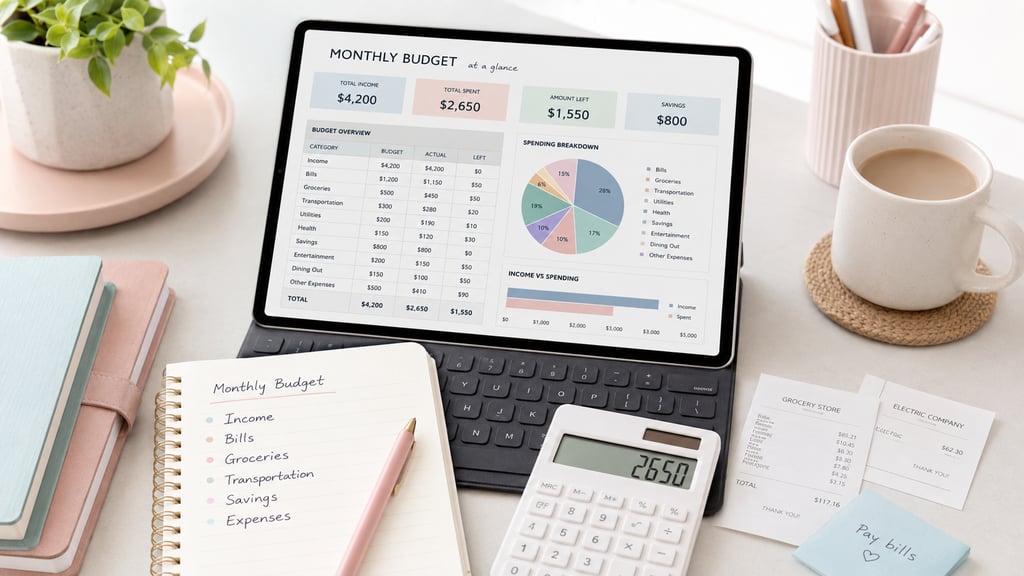
Finally, open the Dashboard tab. This gives you a quick view of your total income, total spending, amount saved, amount left, top spending category, and planned vs actual results. Think of this tab as your monthly money snapshot. It is not there to judge you; it is there to help you make better decisions.
Step 8: Repeat the process each month
At the end of the month, save a copy for your records. Then create a fresh copy for the next month and repeat the same process. Over time, your tracker becomes more than a spreadsheet. It becomes a simple monthly habit that helps you understand your money with more confidence and less stress.
How to Read Your Budget Dashboard
Once you have entered your numbers, your budget dashboard helps you understand the month at a glance. It is not just a page of totals. It is your quick money snapshot, showing what came in, what went out, what is left, and which categories need your attention.
Start with your income. Check whether your actual income matches what you expected. If your income was lower than planned, you may need to adjust spending or savings for the rest of the month. If it was higher, you could decide where that extra money should go before it disappears into everyday spending.
Next, look at your expenses by category. The dashboard can help you see whether your biggest spending areas match your priorities. For example, if eating out, shopping, or subscriptions are higher than expected, you now have a clear place to make a change. If groceries or transportation are higher, you can plan more realistically next month.
Then compare your planned spending with your actual spending. This is where the dashboard becomes especially helpful. If you spent less than expected in one category, you can save the difference, use it toward debt, or move it to another area that needs support. If you spent more than planned, you can decide whether the budget needs adjusting or the habit needs attention.
Try reviewing your dashboard at least once a month, and ideally once a week. A short check-in can help you catch small issues before they become end-of-month stress. The goal is not perfection. The goal is awareness, adjustment, and calmer money decisions.
Common Budgeting Mistakes to Avoid
Budgeting gets easier when you know which mistakes to watch for. Most beginners do not struggle because they are bad with money. They struggle because their system is either too complicated, too vague, or not updated often enough.
One common mistake is forgetting to update the tracker. A budget only helps when it reflects real life. If you set it up once and never return to it, your numbers quickly become outdated. Try choosing one simple review day each week so you can add expenses, check totals, and make small adjustments.
Another mistake is underestimating everyday spending. Groceries, transportation, eating out, personal care, and small online purchases can add up faster than expected. Instead of guessing, use your Expense Log to record what you actually spend. Real numbers are much more useful than perfect guesses.
A third mistake is forgetting irregular expenses. Costs like car maintenance, annual subscriptions, school supplies, holiday gifts, medical costs, and insurance renewals may not happen every month, but they still affect your budget. If you want a fuller home finance setup, you can pair this budget tracker with the [Bill Payment Calendar and Tracker](BILL TRACKER LINK PLACEHOLDER) and the [Debt Snowball Tracker](DEBT TRACKER LINK PLACEHOLDER) for a more complete monthly money system.
Finally, avoid using your budget as a tool for self-criticism. The purpose of a tracker is to help you see, not shame yourself. If one month does not go as planned, use the information to make the next month clearer. Small adjustments repeated over time can create real change.
What’s Included in the Monthly Budget Tracker
The Monthly Budget Tracker for Beginners is built to give you a clear monthly money system without asking you to create formulas, design tabs, or set up categories from scratch. Inside the tracker, you will find prepared sections that help you move from scattered money notes to one organized monthly view.
Here is what is included:
Welcome and Instructions tab to help you understand how to use the tracker and where to begin.
Monthly Setup tab to enter your month, income sources, savings target, debt payment target, and notes.
Expense Log to record daily spending by date, category, subcategory, payment method, planned amount, actual amount, and essential or non-essential status.
Category Summary to help you see where your money is going and which spending areas may need adjustment.
Dashboard to show your total income, total spent, amount saved, amount left, top spending category, and planned vs actual results.
PDF quick-start guide so you can follow the setup process with more confidence.
Beginner-friendly layout with prepared sections, clear labels, and a simple flow you can repeat each month.
Instead of opening a blank spreadsheet and wondering what to create first, you can start with a structure that is already organized for you. Your role is simply to enter your numbers, review your results, and use the information to make calmer monthly money decisions.
Helpful Next Steps
Once your monthly budget is organized, your next step may be to track bills, reduce debt, or organize business income. You may also like:
[Bill Payment Calendar and Tracker](BILL TRACKER LINK PLACEHOLDER) for due dates, payment status, and recurring bills.
[Debt Snowball Tracker](DEBT TRACKER LINK PLACEHOLDER) for payoff progress, debt balances, and monthly payments.
[Small Business Bookkeeping Spreadsheet](BOOKKEEPING LINK PLACEHOLDER) if you also track business income, expenses, and monthly profit.
[Money Bundle](MONEY BUNDLE LINK PLACEHOLDER) if you want the full starter system in one place.
Download the Monthly Budget Tracker for Beginners
When you are ready to make this process easier, the [Monthly Budget Tracker for Beginners](PRODUCT LINK PLACEHOLDER) gives you a prepared place to track your income, log your expenses, set savings goals, review category summaries, and read your monthly dashboard without building anything from scratch.
Inside the tracker, you can enter your income sources, fixed expenses, variable expenses, savings goals, debt payments, and notes in one organized file. The Expense Log helps you record what you actually spend, while the Category Summary and Dashboard help you understand the bigger picture.
This tracker was created for beginners, so the goal is simplicity. You do not need to design tabs, create formulas, or figure out what to track first. You can open your copy, follow the prepared sections, and begin building a monthly budgeting habit that feels clear and repeatable.
If you want a calmer way to understand your money, download the [Monthly Budget Tracker for Beginners](PRODUCT LINK PLACEHOLDER) and start with your next month.
Frequently Asked Questions About Monthly Budget Trackers
Is this monthly budget tracker beginner-friendly?
Yes. The Monthly Budget Tracker for Beginners is designed for people who want a simple way to organize income, expenses, savings goals, and monthly spending without needing advanced Excel skills. The prepared tabs guide you through what to enter and where to review your results.
Do I need Excel skills to use this tracker?
No. You do not need to build formulas or design the spreadsheet yourself. You only need to enter your information into the prepared sections, such as the Monthly Setup tab and Expense Log. The tracker is meant to make budgeting easier, not more technical.
Can I reuse the budget tracker every month?
Yes. At the end of each month, save a copy for your records. Then create a fresh copy for the next month, rename it clearly, and begin again. This allows you to build a simple monthly budgeting habit while keeping each month organized separately.
Can I use this spreadsheet in Google Sheets?
You can upload the Excel file to Google Sheets and make your own editable copy. Some formatting may look slightly different depending on your settings, but the main budgeting structure can still help you track your money in one place.
What should I track in a monthly budget?
A good monthly budget should include income, fixed expenses, variable expenses, savings goals, debt payments, and irregular expenses. Tracking these categories helps you understand what is coming in, what is going out, and what may need adjustment. For bills and due dates, you can use the [Bill Payment Calendar and Tracker](BILL TRACKER LINK PLACEHOLDER) alongside your budget. For debt payoff, use the [Debt Snowball Tracker](DEBT TRACKER LINK PLACEHOLDER) to track balances and progress separately.
How often should I update my budget tracker?
For best results, update your tracker at least once a week. Some people prefer to add expenses daily, while others do a weekly money check-in. The most important thing is to choose a rhythm you can repeat consistently.
Is a budget spreadsheet better than a budgeting app?
It depends on how you like to manage your money. A budgeting app can be useful, but a spreadsheet gives you more control, more visibility, and no extra subscription. If you prefer a clear system you can own, edit, and reuse, a monthly budget spreadsheet may be a better fit.
Excel tools and digital systems built to simplify business, money, and creator workflows.
Contact
GET FREE TOOLS & TIPS
info@plantrackgrowstudio.com
© 2026 Plan Track Grow. All rights reserved.
QUICK LINKS
Shop all products
Money Templates
Productivity Templates
Join the newsletter for spreadsheet tips, creator systems, business organization ideas, and free Excel resources.
✓ Instant digital downloads
✓ Beginner-friendly spreadsheets
✓ Excel compatible
Company


Plan Better. Track Easier. Grow Smarter.
We respect your privacy. Unsubscribe anytime.




Digital Products Only. No physical items will be shipped.
Made with 💚 for organized lives and growing businesses.



Creator Templates
Wellness and Life Templates
Home and Student Templates
Free Resources
Legal